 packlight
See the tokens Claude Code and Codex load before you type.
Every session starts with your whole setup: every MCP tool name, every skill, every hook's text, CLAUDE.md and AGENTS.md. packlight measures it from your own session logs, shows what you never use, and archives it in one step. Undo anytime.
Free and MIT licensed. Runs on your computer and sends nothing anywhere. macOS, Linux and Windows.
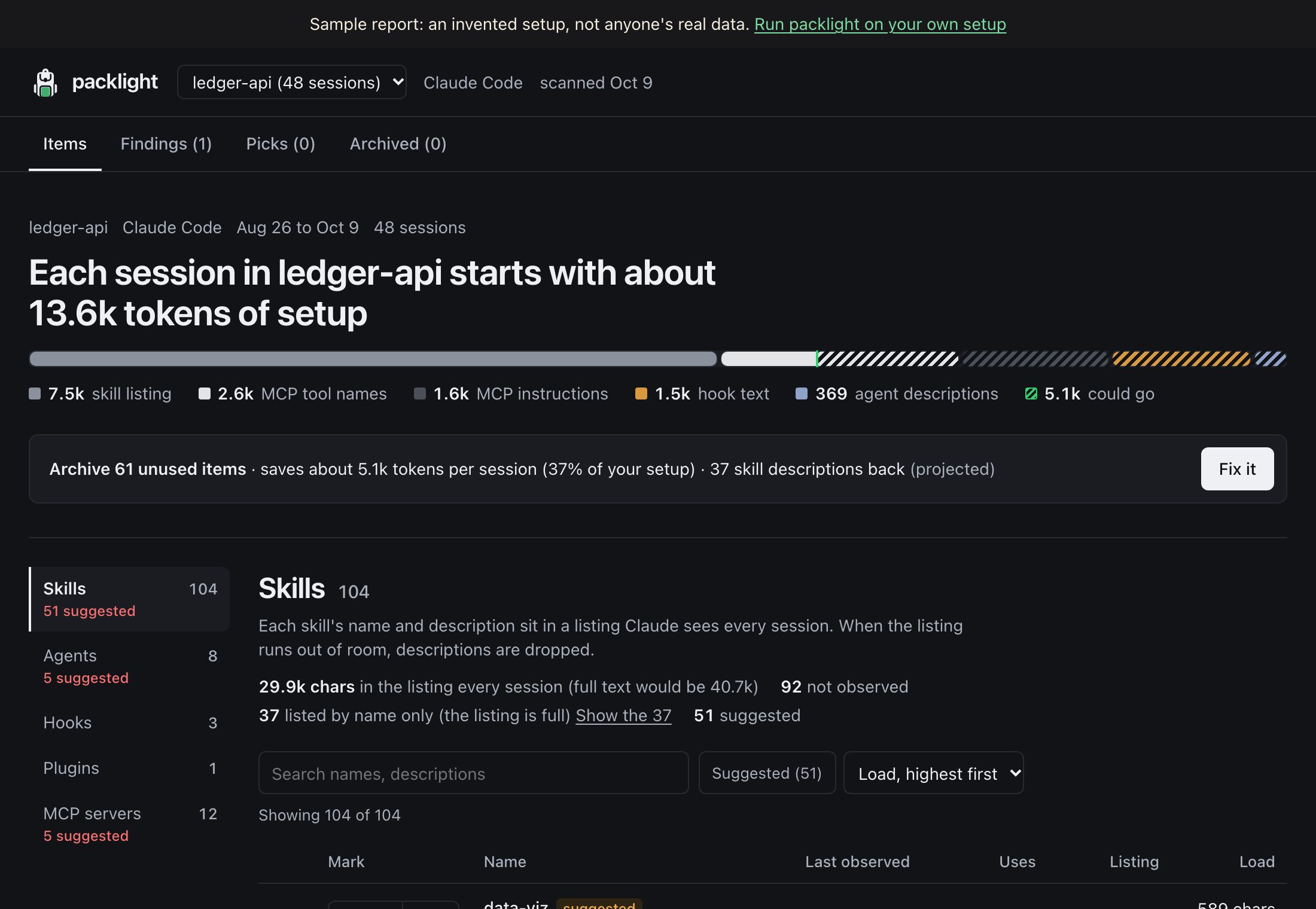
What packlight shows you
How much of the context window your setup takes before you type, split by source. For Codex the number is measured: Codex logs each session's input tokens.
Each server's tool names and instructions, which load every session whether you call them or not, and how often you actually do.
Which skills you used, which you never did, and which Claude Code dropped from its skill listing because it ran out of room.
The text each hook adds to your sessions and how long it takes to run.
Archives everything unused since it was installed, after one question. Items only you can remove (claude.ai connectors, app plugins, Codex config) come with the exact place to do it.
Try it on your setup
Run it, no install needed. Needs Node 20 or later.
npx packlight-cli                 # Claude Code
npx packlight-cli --agent codex   # Codex
Or install it once and use the short command.
npm install -g packlight-cli
packlight                 # scan and open your report
Archive what you don't use. It shows the plan and asks once. Everything can be put back.
packlight fix
packlight restore --all   # undo
Questions
Why does my Claude Code context fill up before I type anything?
Every session starts with your whole setup: the name of every MCP tool, a listing of every skill, the text your hooks add, agent descriptions and CLAUDE.md files. packlight measures each part from your local session logs, so you can see which part is biggest.
Does packlight read my conversations?
It reads your session logs, which hold your chats, but only on your computer and only to count which skills, agents, MCP servers and hooks were used. What it saves is counts, dates, and the names and descriptions of your installed items. It never saves your messages, makes no network requests, and the report is a file on your own disk.
How many tokens do MCP servers use?
Claude Code names every MCP tool at the start of each session, and some servers add instructions. A server with 200 tools can cost over 3,000 tokens per session even if you never call it. packlight shows each server's cost and how often you used it.
How does packlight decide what is unused?
An item counts as unused when no session called it since it was installed, over at least 20 sessions and 14 days. Items you mark Keep, items whose use can't be told apart from another item's, and anything a suite like gstack installed are never suggested.
Are the token numbers exact?
For Codex, yes: Codex logs the input tokens of each session's first request, and packlight reports the median. For Claude Code they are estimates from the characters each part adds, at about 4 characters per token, so treat them as close, not exact. The report shows exact character counts too.
Does it work with Codex?
Yes. For Codex, packlight reads the input tokens Codex logs, so the headline is measured. Codex plugins and MCP servers are switched off in ~/.codex/config.toml; packlight shows you the exact line to change.
What about Cursor, Windsurf or Gemini CLI?
Not yet. packlight reads the files Claude Code and Codex write; other tools keep their history differently. If you'd like one added, open an issue on GitHub.
Is it safe? Can I undo it?
packlight asks before changing anything, moves items into ~/.packlight/archivepacklight restore --allpacklight archive list shows each item, and packlight restore with its id brings back just that one. It never edits CLAUDE.md or AGENTS.md.
What about things I can't remove from my computer?
Some items live in an app or online: claude.ai connectors and synced skills, the Claude desktop app's plugins, Codex plugins and MCP servers. packlight lists the unused ones with exactly where to turn each off, and what removing them would save.
What if an update brings an archived item back?
Plugin updaters sometimes reinstall what you archived. packlight notices on the next scan and lists it under Findings as having come back, so you can archive it again.
How is this different from /context?
Claude Code's /context shows what one session holds right now. packlight looks across all your sessions to find what you never use, removes it safely, can put it back, and works for Codex too.
Is this the same as /doctor prompt-audit?
No, and they work well together. /doctor prompt-audit checks what your instructions say: outdated wording, references to files that no longer exist, rules that contradict each other. packlight measures what your setup costs each session, across all your sessions, and removes what you never use. A CLAUDE.md can be well written and still cost thousands of tokens; an unused MCP server never shows up in a prompt audit. Use both.
Is it free? Who made it?
Yes, free and open source under the MIT licence. Built by Cooper Kao, with the code on GitHub.
How do I uninstall it?
Run packlight restore --allnpm uninstall -g packlight-cli, and delete ~/.packlight. If you only ever used npx, deleting ~/.packlight is enough.